In this tutorial, we’ll walk through how to automatically generate realistic videos and talking-style clips for your AI Influencer using SocialAppFarm.
Before we begin, make sure you’ve completed the following:
- ✅ Set up your Text Style (see previous tutorial: Creating Text Styles for Video Overlays )
- ✅ Created and trained your AI Influencer (see: Creating Your First AI Influencer)
- ✅ Generated some AI images to use as input (see Auto generating your AI Images)
⚠️ Important
AI generation results may vary. While SocialAppFarm’s AI tools are designed to create high-quality content, outputs are not always perfect. You may need to generate multiple times or adjust prompts and settings to achieve the best results. Quality improves with better input images, detailed prompts, and consistent experimentation.
Step 1: Create Content Queues
We’ll create three queues — one for videos, one for daily text quotes (optional), and one for background music (optional).
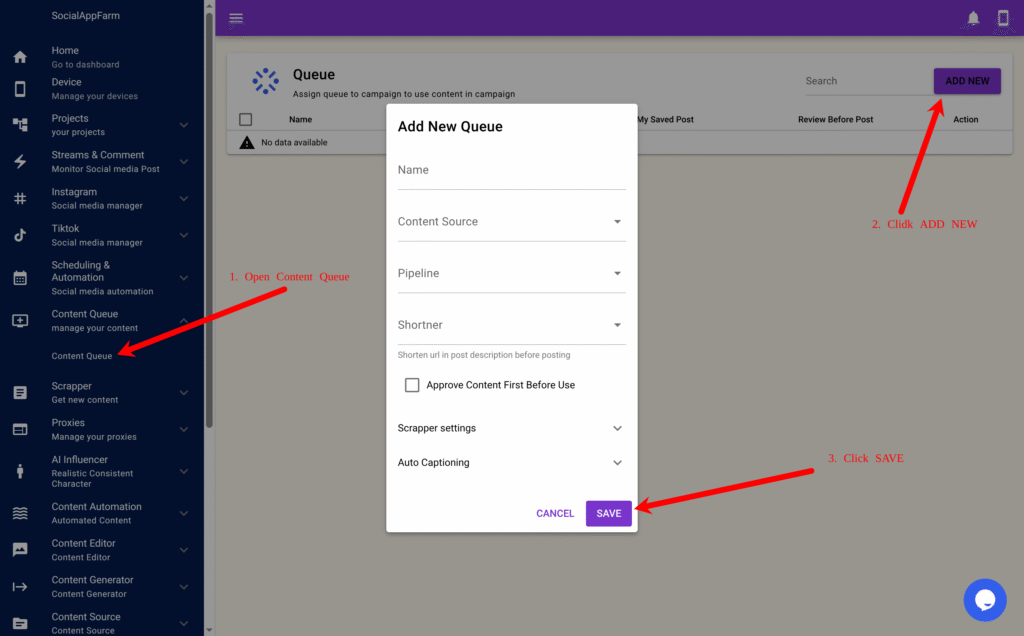
- Go to Content Queue → Content Queue in the main menu.
- Click Add New, enter the name:
My Influencer Video QueueClick Save. - Click Add New again, enter the name:
My Daily QuotesClick Save. - Click Add New once more, enter:
Background MusicUpload your preferred background tracks into this queue, then click Save.
Step 2: Automate Daily Quote Generation
Now, we’ll use AI to automatically generate new daily quotes for our influencer videos.
- Go to Content Automation → Text Content.
- Click New.
- In Run Times Per Day, enter
4(so it runs four times daily). - In the Prompt box, enter:
You are a social media post expert. Generate a daily quote of a person living their best life . Return only the text — no quotation marks or extra commentary or invisible lines. - In the Output Queue, select My Daily Quotes.
- Click Save.
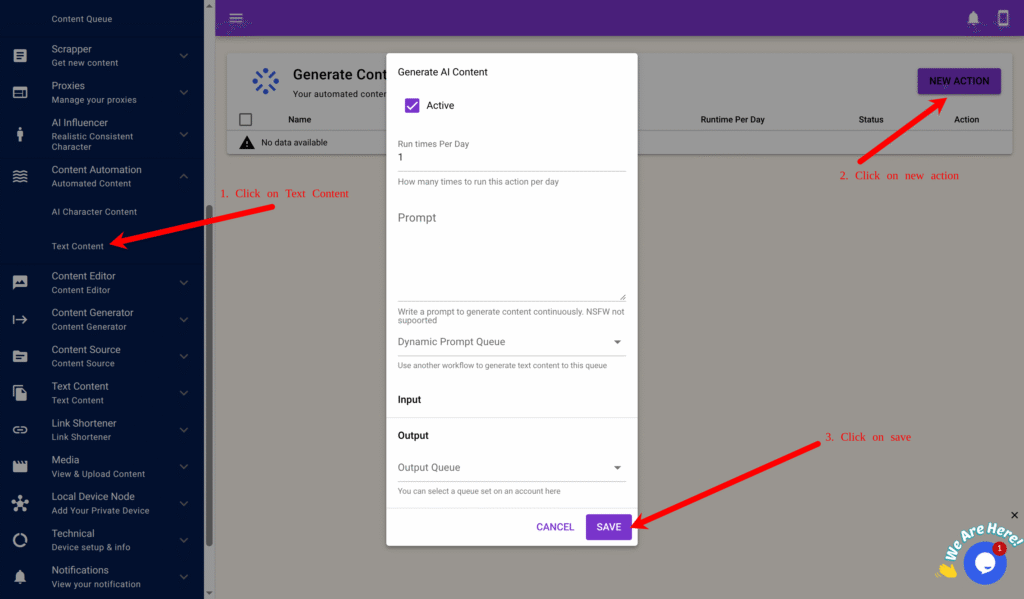
✅ SocialAppFarm will now generate fresh motivational quotes automatically throughout the day.
Step 3: Automate Video Generation
Now we’ll connect all the parts — images, quotes, music, and text style — to automatically produce full influencer videos.
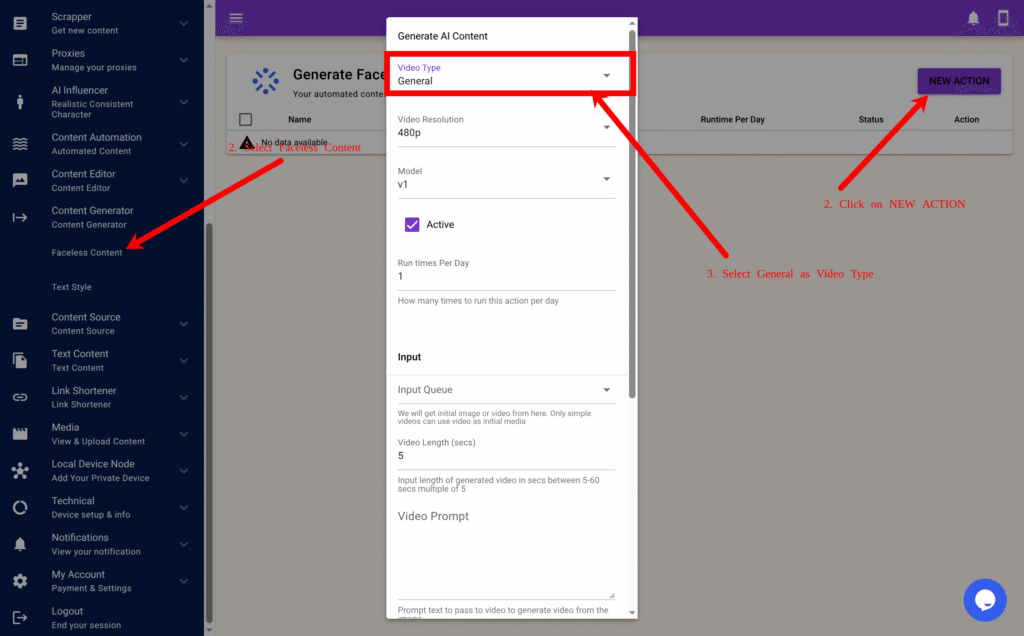
- Go to Content Generator → Faceless Content.
- Click New to create a new video automation form.
- Fill in the fields as follows:
| Field | Description |
|---|---|
| Run Times Per Day | Choose how many times per day to generate videos (e.g., 2). |
| Video Type | Select General. |
| Resolution | Choose 480p or 720p (720p gives better quality but uses more credits). |
| Model | Select v1 or v2 (v2 is higher quality, more realistic). |
| Input Queue | Select the queue that stores your AI influencer images. |
| Video Length | Enter the video duration in seconds (e.g., 5, 10 or 15). |
| Video Prompt | Optional: enter a default prompt (e.g., “happy and smiling”) or leave blank for dynamic prompts. |
| Text Queue (Optional) | Select My Daily Quotes (from Step 2). |
| Background Music Queue (Optional ) | Select Background Music. |
| Text Style | Choose the style you previously created (e.g., My First Text Style). |
| Output Queue | Select My Influencer Video Queue. |
- Click Save.
Caption Notes
If the image in your input queue has a caption, it will automatically be transferred to the generated video.
If a caption includes a colon (:), SocialAppFarm will treat it as:
- Text before the colon → shown as an overlay on the video.
- Text after the colon → used as the post caption on social media.
Example:
At the beach: A relaxing moment by the sea
- “At the beach” → displayed as video text.
- “A relaxing moment by the sea” → used as your post caption.
Step 4: Review and Auto-Post
Once saved, SocialAppFarm will begin generating daily AI videos automatically.
Just keep uploading fresh images or generate it using your AI Influencer to your input queue Socialappfarm will keep generating new videos and post to your account.
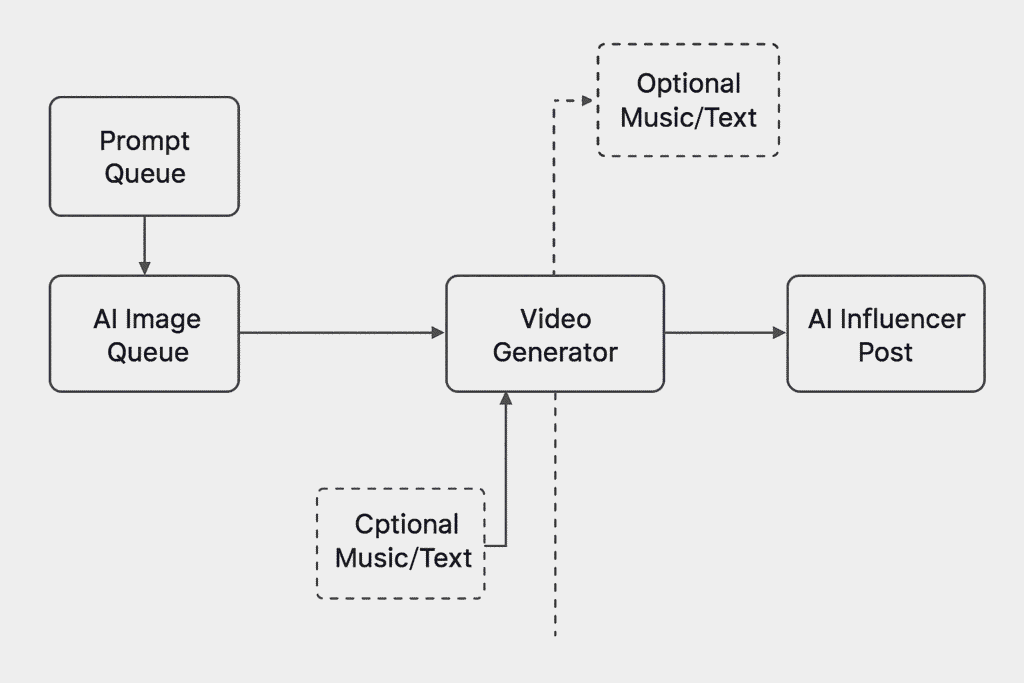
Each video will:
- Use images from your AI influencer image queue
- Optionally add quotes from your daily text queue
- Apply your custom text style for captions
- Optionally Add background music
- Save the final result into your video output queue
✅ You can review generated videos by going to:
Content Queue → View → View Content under My Influencer Video Queue.
From there:
- Click on a video to preview or trim unwanted sections.
- Approve the videos you want posted.
Finally, set your campaign to use the My Influencer Video Queue as its content source.
SocialAppFarm will automatically post approved videos to your TikTok and Instagram accounts on schedule.
🎬 Automation Workflow Summary
| Step | Task | Purpose |
|---|---|---|
| 1 | Create content queues | Organize videos, quotes, and music |
| 2 | Automate quote generation | Produce daily captions dynamically |
| 3 | Configure faceless video automation | Combine images, quotes, and music |
| 4 | Review and approve videos | Ensure content quality before posting |
| 5 | Campaign auto-posting | Publish videos to TikTok & Instagram |
✨ Final Result
You now have a fully automated AI influencer video pipeline:
- Prompts → generate quotes
- Quotes + AI images → create videos
- Videos → automatically posted to TikTok & Instagram
With SocialAppFarm, your AI influencer can now speak, move, and post — creating content 24/7 without any manual effort.
Leave a Reply