SocialAppFarm includes a powerful feature that lets you track new Reddit posts or comments containing your brand name or specific keywords — and automatically engage with them using AI-generated or manual comments.
You can monitor multiple subreddits or keyword streams from your dashboard, review the posts, and decide whether to comment manually or let AI handle the responses automatically.
Add-ons You’ll Need
- Social Appfarm Main Device Subscription
- Reddit Comment Marketing Addon
Optional Addons
You can also use multiple account for large projects and setups (Commenting is rotated among these account)
- Manage up to 25 Extra Social Media Accounts per Device
- Proxies (1-3) account per proxy
- Google Drive account (for device backups)
Chapter 1: Setting Up Your Proxy and Accounts
If you plan on running many reddit accounts, a proxy is essential for stability and safety.
Recommended Proxy Types
- Best: 4G/5G Mobile Proxy
- Good: ISP or Residential Proxy (cost-effective and reliable)
Ratio: 1 proxy for every 1–3 accounts (max 4).
For 25 accounts, buy around 8 proxies.
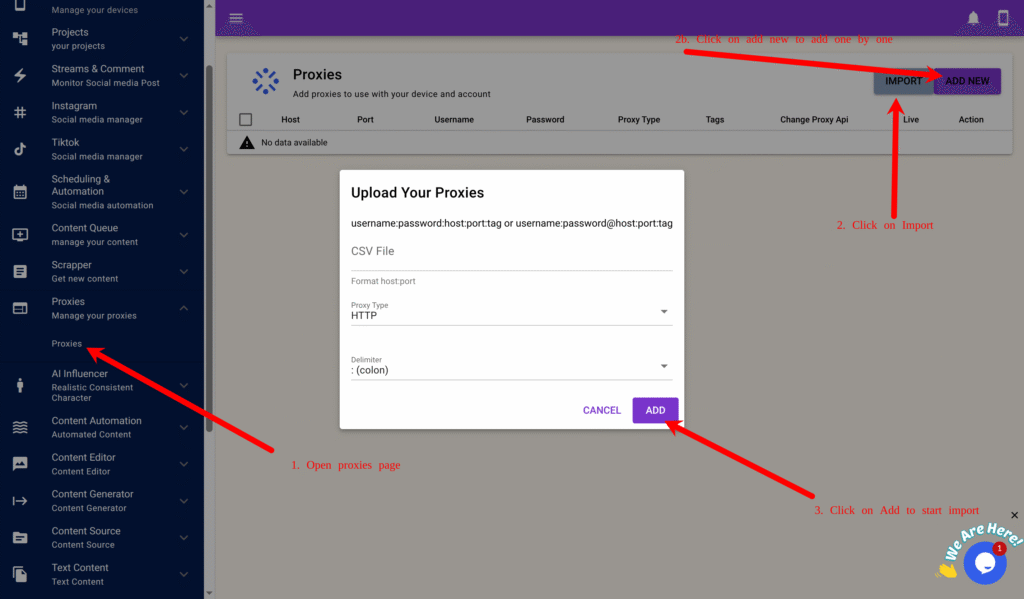
Step 1: Adding or Importing Proxies
- Go to Proxy → Proxy in the main menu.
- Click Add New and fill in the following as an exmample:
Host: 1.1.1.1Port: 8080Username: userPassword: passTag: automationProxy Type: HTTP or Socks5Proxy Change URL: (if you only have one proxy and its supports automatica rotation through url input the url)
- For bulk import, create a proxy
.txtfile:username1:password1:1.1.1.1:8080:automation username2:password2:1.1.1.2:8080:automation
- Click Import, select the file, proxy type and click Add.
Chapter 2: Creating Your Campaign, and Backup
To support multiple accounts per device, we’ll back up data to Google Drive.
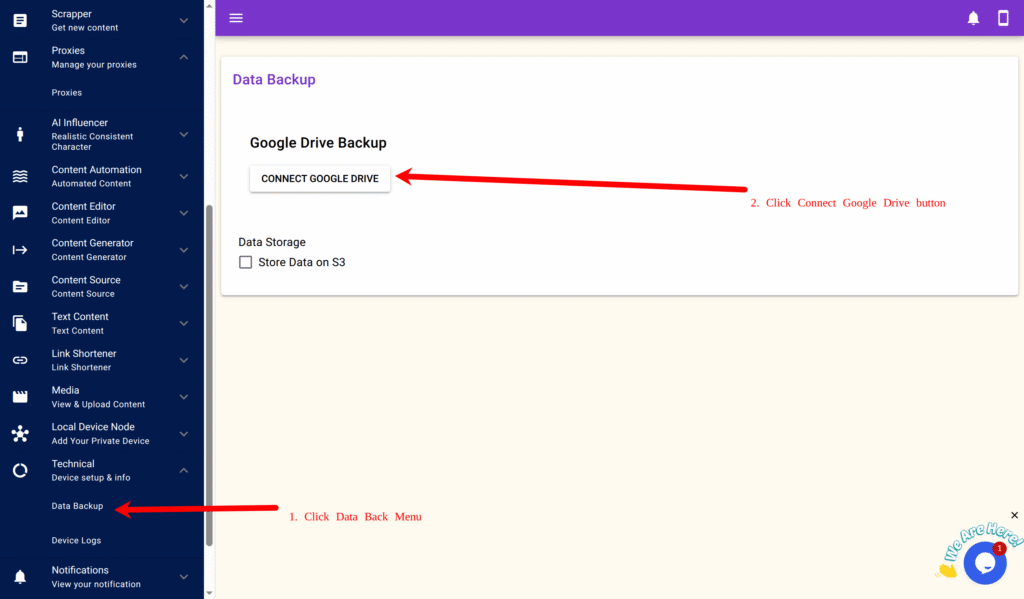
Step 1: Connecting Google Drive
- Navigate to Technical → Data Backup → Connect Google Drive.
- Log in to your Google account and authorize SocialAppFarm.
- You’ll be redirected back automatically.
For large-scale setups, you can alternatively use Cloudflare R2, Idrive E2, Amazon S3 or any S3-compatible storage.
Step 2: Create a Reddit Automation Campaign
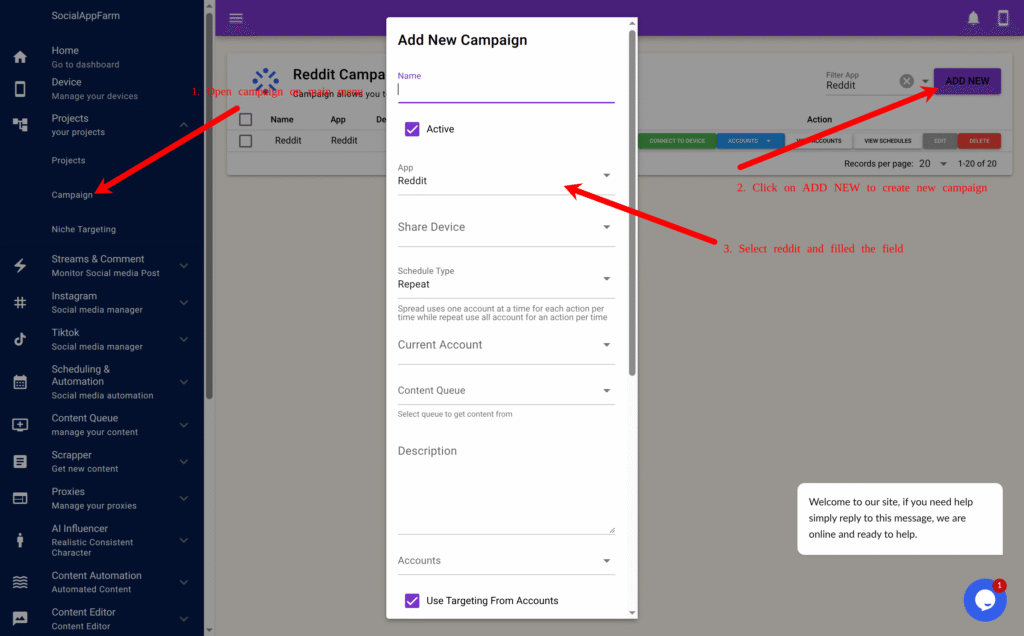
- From the main menu, go to Projects → Campaign.
- Click Add New to create a new Reddit automation campaign.
- Name: Enter a campaign name e.g Watch Campaign.
- App: Select Reddit as your platform.
- Share Device : Select your Reddit device
- Use Comment & PM From Accounts: Untick field
- Use AI To Generate Comment: Tick this (Requires credit)
- Extra Comment Prompt: Input prompt for AI to generate comment for reddit post e.g Short Helpful comment that sounds human and natural. Mention my ebook about dog training “BOOK NAME” if post is about dog training
- Click Save.
This campaign will handle the automatic commenting on tracked Reddit posts.
Step 3: Import or Add Your Account
Note: Only username is important when adding or Importing your account but socialappfarm can help you auto login if you include your password, it can also retrieve code from email if your email has imap access
- On the created campaign, click View Accounts → Import. (You can also add your account ony by one by clicking on Add New and fill in the account info)

- Format your bulk import (CSV or TXT):
username:password:email:emailpassword:biolink:bio:2fakey(Example below)username1::::::username2:pass2:::::2faKey2
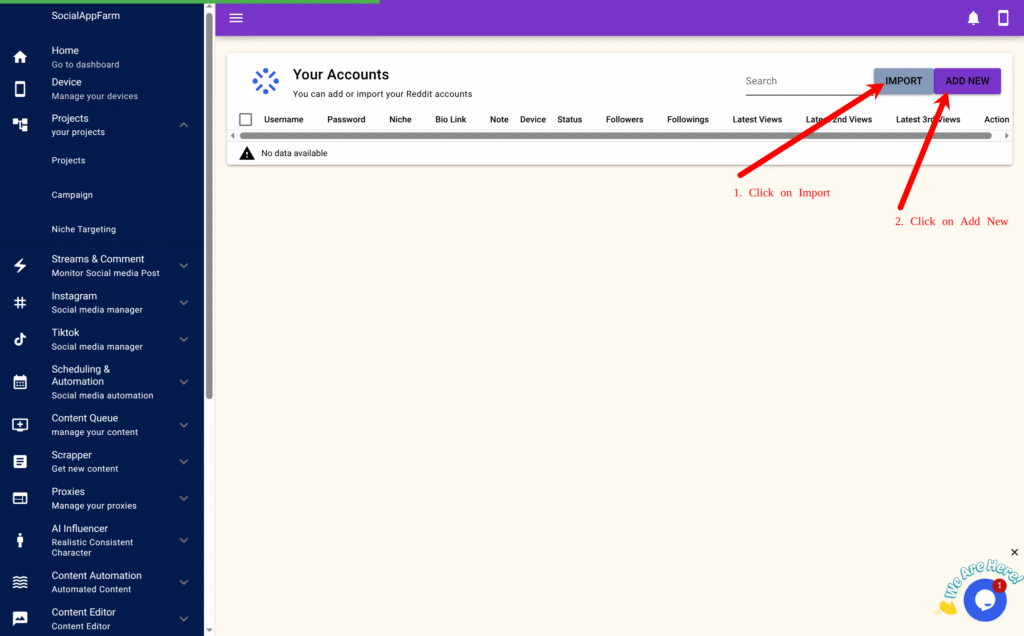
- Upload and import.
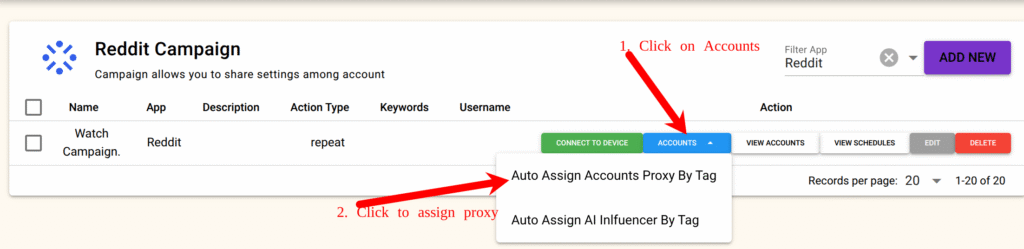
- Then go back to the Campaign page again and click Accounts → Auto Assign by Proxy Tag, input your tag (e.g.,
automation), and confirm. - Proxies will now be evenly distributed to all accounts.
Step 4: Logging Into Accounts
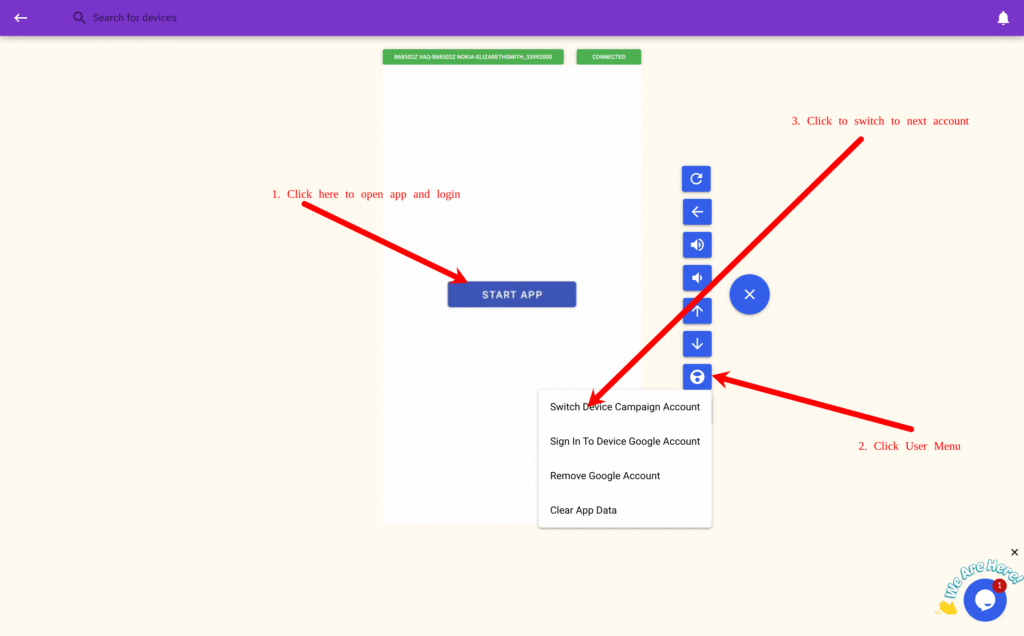
- Open your campaign and click Connect Device
- (Important : Connect from the campaign page, not the device list).

- On the device stream page, click Start App, then log in manually.
- Click the “+” icon → User Menu → Switch Device Campaign Account, select the next account, and repeat the login.
Step 5: Schedule Comment Stream On Your Campaign
You need to set up a schedule for automatically commenting on stream posts from your automation campaign.
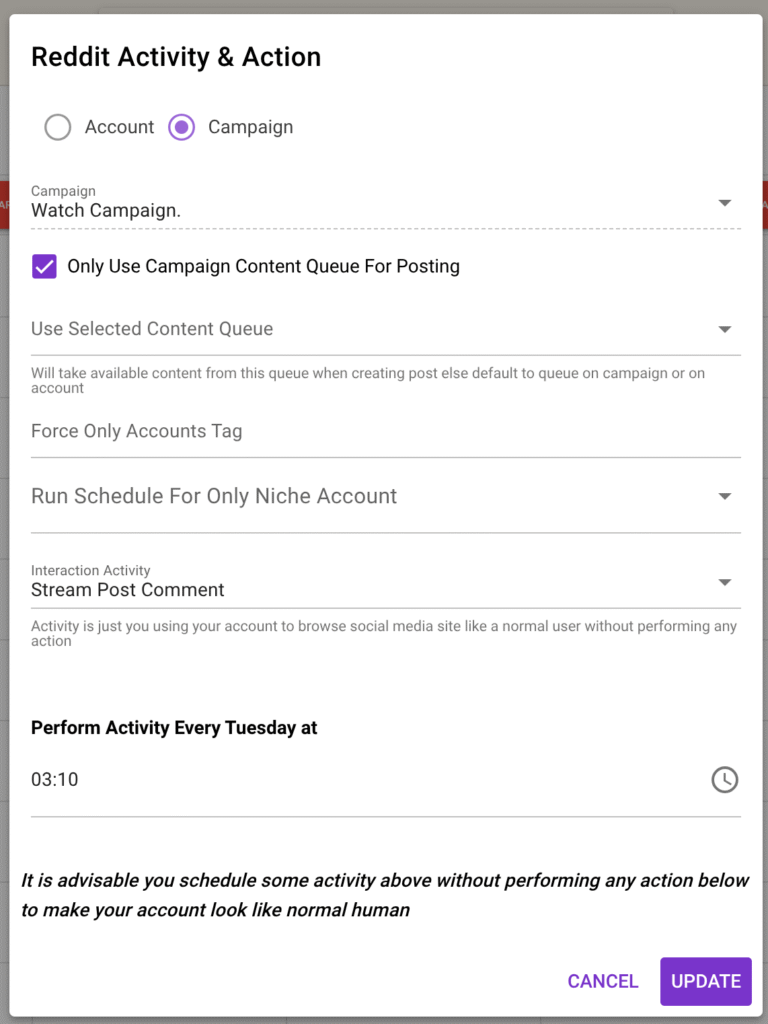
- On the created campaign, click VIEW SCHEDULES

Schedule the Stream Post Comment interaction activity for the days and hours you want comments to be posted.
SocialAppFarm will automatically comment on all approved Reddit stream posts from your dashboard.
You can:
- Write comments manually, or
- Allow AI to auto-generate replies based on your campaign’s comment prompt.
Chapter 3: Creating Your Stream Campaign
Step 1: Set Up a Stream Campaign for Reddit
- On the main menu, go to Streams & Comments → Stream Campaign.
- Click Add New to create a new stream campaign.
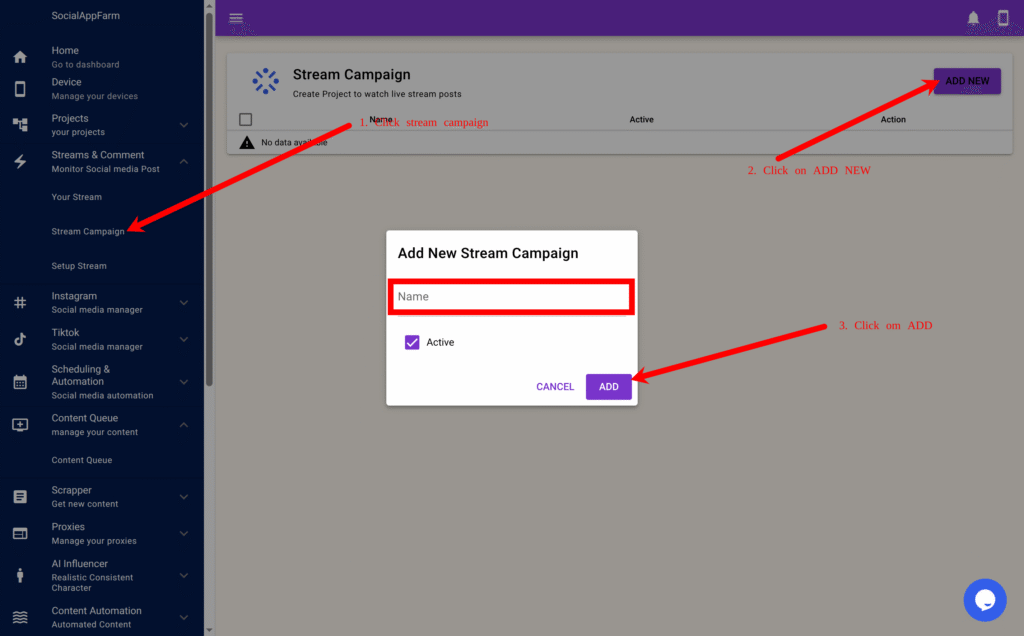
- Enter a name — for example: Watch My Brand on Reddit.
- Click ADD.
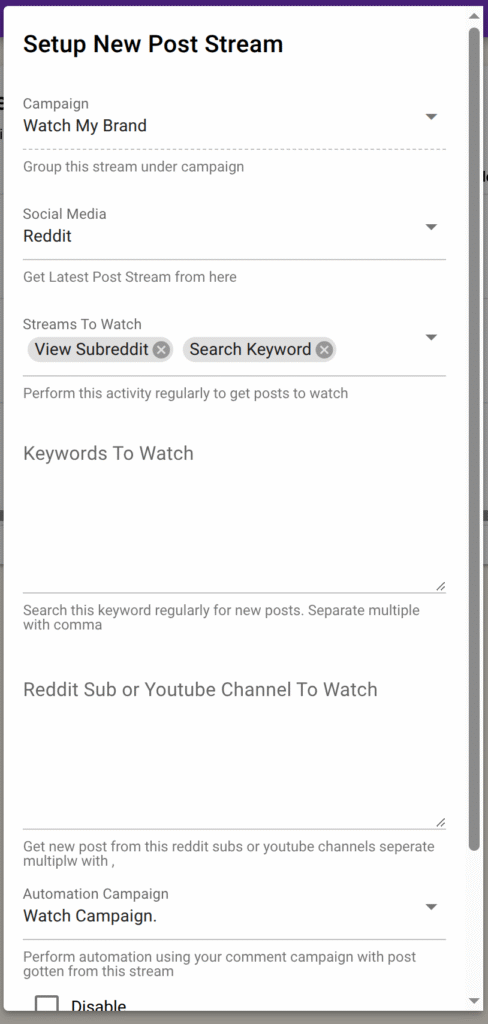
Step 2: Set Up a Stream for Reddit
- Click View Stream Setup on your newly created campaign.

- Click Add New to create a stream setup.
In the pop-up form:
- Choose Reddit as the social media platform.
You can choose between these stream types:
- View Subreddit → Monitors specific subreddits for new posts or comments.
- Search Keyword → Finds Reddit posts containing your chosen keywords across subreddits.
In the Keywords field, enter the list of words or phrases you want to monitor — separated by commas.
Example:
shopify, dropshipping, ecommerce, viral product
In the Subreddits field (for “View Subreddit” type), enter subreddit names separated by commas.
Example:
Entrepreneur, eCommerce, SmallBusiness, SideHustle
In the Automation Campaign field, select the Reddit campaign you created under Project → Campaign. (Chapter 2 Step 2)
⚠️ Make sure “Stream Comment” is scheduled on that campaign so comments are posted regularly.
Step 3: Additional Options
- Approve Post Before Automated Action → ✅ Tick this to manually review Reddit posts before the system comments.
- Disable → Temporarily stop fetching new posts for this specific stream.
You can create multiple streams per Reddit campaign — for example:
- One stream that watches keywords like Shopify or Dropshipping, and
- Another stream that monitors subreddits like r/ecommerce or r/marketing.
Click Add to save your stream setup.
Repeat these steps to create multiple keyword or subreddit streams as needed.
Step 4: Monitor and Manage Your Reddit Streams
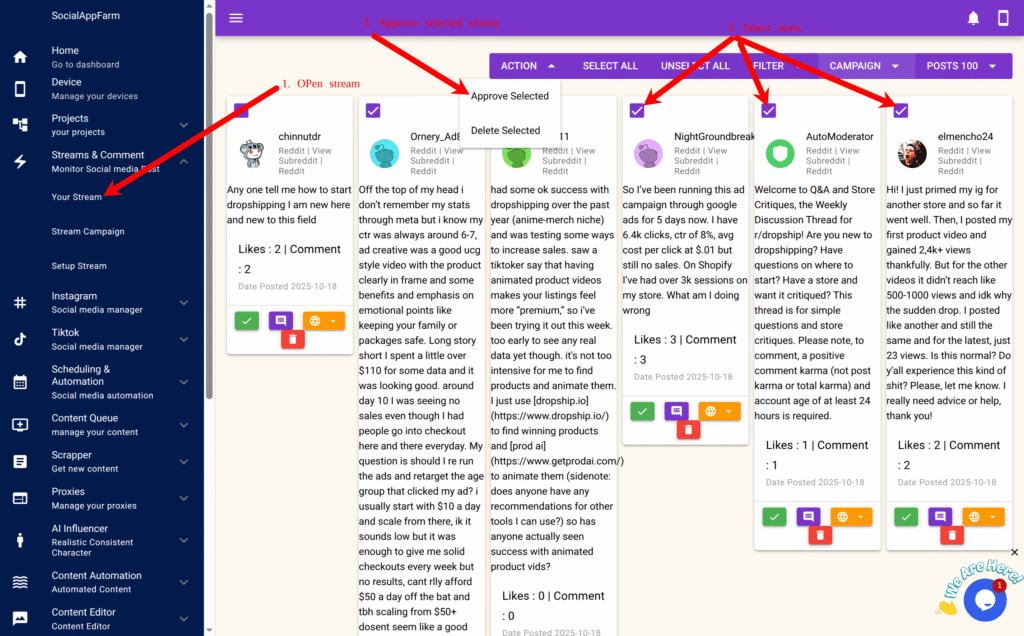
From the main menu, go to Your Stream to:
- View all new Reddit posts matching your keywords or subreddit streams.
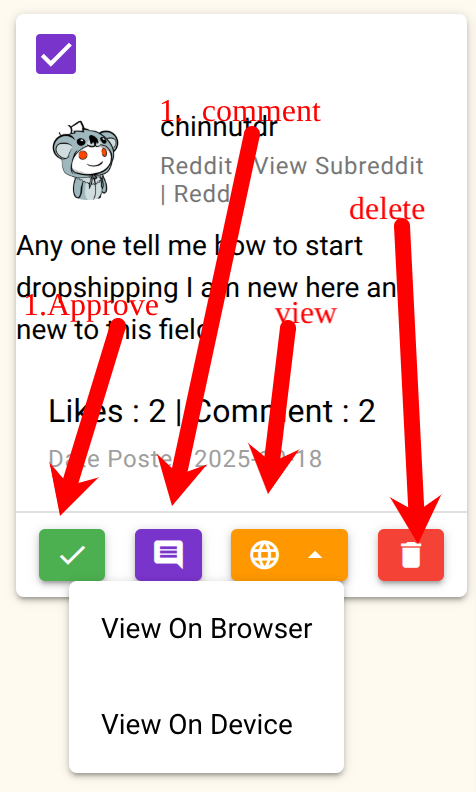
- Open the posts directly in your browser or device for quick engagement.
- Filter or hide posts that don’t match your brand or niche.
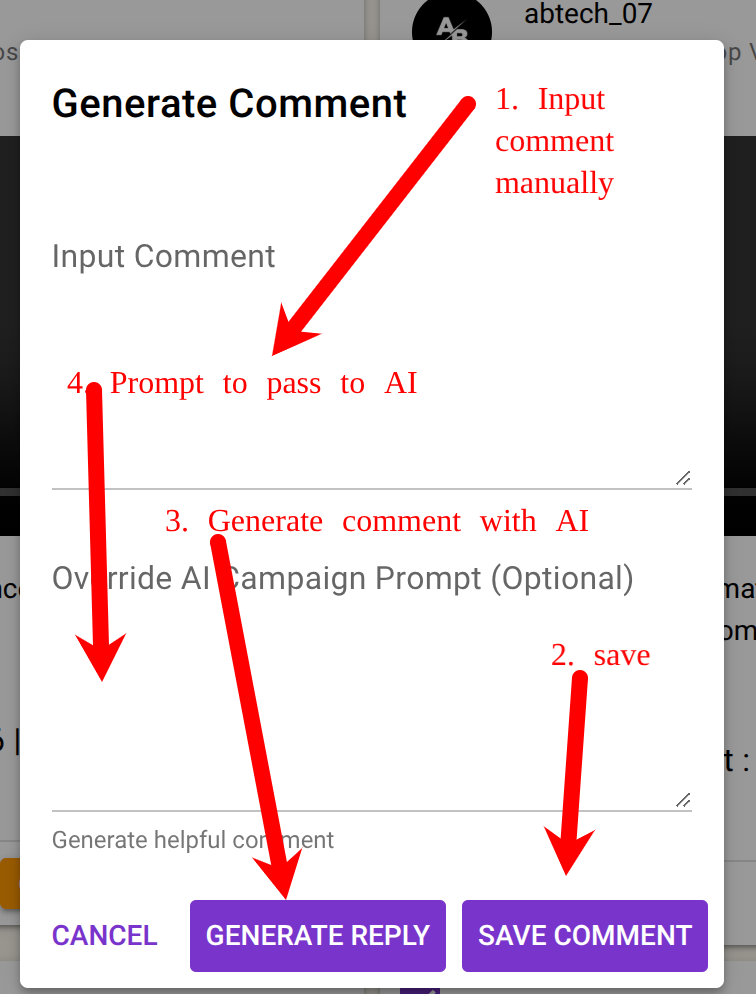
- Use the AI Comment Generator to automatically create contextual comments.
- Manually input or edit comments if needed.
- Approve posts to enable automatic commenting by your selected automation campaign.
✅ Result
You can now:
- Monitor Reddit for new discussions mentioning your brand or keywords.
- Automatically comment or reply using AI-powered responses.
- Stay active in relevant communities without manual effort.
- Manage everything directly from your SocialAppFarm dashboard.
Example Use Cases
- Track mentions of your product or brand across multiple subreddits (e.g., r/shopify, r/Entrepreneur).
- Auto-comment on trending Reddit posts in your niche using AI-generated helpful or witty replies.
- Drive organic traffic by engaging consistently in subreddit conversations — all on autopilot.
Leave a Reply